We Audited 1,200 Electrician Websites — These 5 Fixes Move the Needle Most
1,200+ electrician sites audited. Average score: 41/100. These 5 fixes account for the widest score gaps — from a 5-minute code change to a 2-week SEO project.
We’ve spent months showing you what’s broken. A phone number that doesn’t work on mobile. Service area pages that don’t exist. Websites that go dark at 6 PM. License numbers hidden from view. Ad budgets poured into broken funnels. Each problem documented with real data from 1,200+ audited electrician sites across 9 states and 51 cities.
Now here’s the part that matters: what to fix first.
Not everything carries equal weight. Some fixes take 5 minutes and swing your score by 20 points. Others take two weeks but unlock an entire category of search traffic you’ve been invisible to. We ranked every feature gap in our dataset, sorted by the difference in average score between sites that have it and sites that don’t. Five fixes rose to the top. They’re the ones that separate a 32/100 site from a 59/100 site — and the good news is that three of them can be done in a single afternoon.
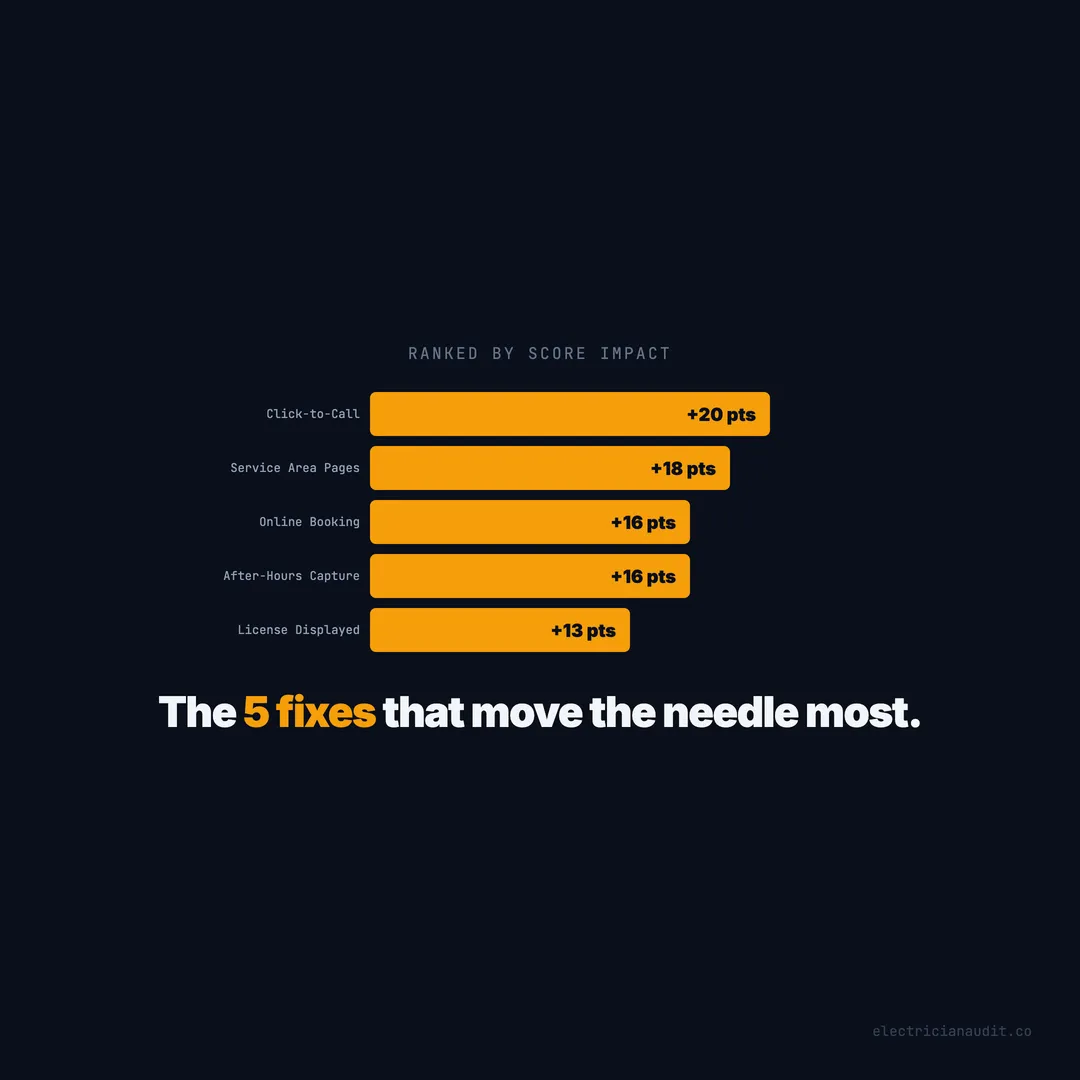
TL;DR: Out of 1,200+ electrician websites we audited, five fixes produced the widest score gaps: click-to-call (+20 points), service area pages (+18), online booking (+16), after-hours capture (+16), and license display (+13). Three of the five take less than a day. Sites with all five average 59/100 versus 32/100 for sites with none (Electrician Audit, 2026).
How We Ranked These Fixes: Score Gap = Impact
We didn’t rank these by gut feel. Every electrician website in our dataset received a quality score based on 40+ factors — mobile usability, trust signals, conversion paths, SEO structure, security. For each feature, we compared the average score of sites that have it against the average of sites that don’t. The difference is the gap. The gap is the impact.
Here’s the full ranking:
| Rank | Fix | Score With | Score Without | Gap | Effort |
|---|---|---|---|---|---|
| 1 | Click-to-call | 52 | 32 | +20 | 5 minutes |
| 2 | Service area pages | 59 | 41 | +18 | 1–2 weeks |
| 3 | Online booking | 55 | 39 | +16 | 1 day |
| 4 | After-hours capture | 57 | 41 | +16 | 1 day |
| 5 | License display | 54 | 41 | +13 | 15 minutes |
Two honorable mentions: reviews embedded on-site (+13 points, 56 vs 43) and HTTPS with form and CTA (+12 points, 55 vs 43). Both matter. But the five above consistently produced the widest gaps and affect the most sites.
[ORIGINAL DATA] These rankings come from 1,259 deep-audited electrician websites across Texas, Florida, Arizona, Georgia, North Carolina, Tennessee, Louisiana, South Carolina, and New Mexico. No sampling. No estimation. Every number is a direct comparison from the full dataset.
Citation capsule: When 1,200+ electrician websites were scored on 40+ quality factors, five features produced the widest performance gaps: click-to-call (+20 points), service area pages (+18), online booking (+16), after-hours capture (+16), and license display (+13) — measured as average score with vs without each feature (Electrician Audit, 2026).
Fix 1: Make Your Phone Number Clickable — The 20-Point Gap That Takes 5 Minutes
This is the single largest score gap in the entire dataset. Sites with a clickable phone number score 52/100 on average. Sites without one score 32/100. That’s a 20-point difference — wider than any other single feature we measured (Electrician Audit, 2026).
And 29% of electrician websites still get this wrong. Nearly one in three sites display their phone number as plain text that can’t be tapped on a phone.
Why this gap is so wide
Click-to-call isn’t just a usability feature. It’s a proxy for mobile readiness. Sites that have it tend to also have responsive layouts, proper viewport tags, and faster load times. Sites that miss it tend to miss everything else. The 20-point gap reflects that cluster effect — but the fix itself is dead simple.
One line of HTML:
<a href="tel:+15125550192">(512) 555-0192</a>That’s it. Wrap your phone number in a tel: link. Test it on your phone. Move on. The full deep dive on click-to-call covers the compounding effects, but the core fix takes less time than making coffee.
What you lose without it
A homeowner with a tripped breaker at 9 PM can’t copy-paste your number on mobile. She can’t long-press to call on every device. She hits the back button and calls the next result. You lost that $400+ emergency job because of a missing HTML tag.
Here’s the uncomfortable truth: you’ve probably never tested your own website on a phone. Most electricians haven’t. Pull yours up right now and tap the number. If nothing happens, you’ve found your first fix.
[PERSONAL EXPERIENCE] When we manually tested sites during the audit, the non-clickable phone numbers created immediate frustration — the kind that sends people straight back to Google. It wasn’t subtle. It was a wall.
Citation capsule: 29% of electrician websites display phone numbers as plain text rather than tappable tel: links, creating a 20-point quality gap (52 vs 32 out of 100) — the widest single-element difference across 1,200+ audited sites (Electrician Audit, 2026).
Fix 2: Build Service Area Pages — The 18-Point Gap That Unlocks Local Search
Service area pages produce the second-widest score gap in the dataset: 59/100 vs 41/100, an 18-point spread (Electrician Audit, 2026). And 70% of electrician websites have zero service area pages — not thin ones, not weak ones, none at all.
This is the fix that takes the most effort. It’s also the fix with the highest ceiling.
What “no service area pages” actually costs you
Google can’t guess your service territory from a bullet list in the footer. When a homeowner searches “electrician in Katy TX” or “panel upgrade Chandler AZ,” Google needs a crawlable, dedicated page to match that query. Without one, you don’t exist for that search. Period.
The 70% of electricians without city pages have forfeited every suburb-level search to the 30% who built them. Those searches aren’t low-volume, either. City-specific electrical queries add up to thousands of monthly searches in any decent metro area.
How to build them without looking spammy
Each service area page needs three things: unique content about your work in that city, your services available there, and a clear call to action. Don’t spin the same paragraph 40 times with different city names swapped in. Google caught onto that years ago.
Start with your top 5 to 10 service cities. Write 400+ words per page. Mention landmarks, neighborhoods, permit requirements, or common electrical issues specific to that area. Link each page to your relevant service pages. Internal linking between city pages and service pages is what makes this work for SEO — and it’s what pushes these sites to that 59/100 average.
Is it a weekend project? No. It takes 1 to 2 weeks of real effort. But no other single fix in our dataset unlocks as much search visibility. The full service area breakdown walks through the numbers city by city.
Citation capsule: 70% of electrician websites have zero dedicated service area pages, missing suburb-level search queries entirely. Sites with service area pages score 59/100 versus 41/100 without — an 18-point gap representing the largest SEO-driven score difference in a dataset of 1,200+ audited sites (Electrician Audit, 2026).
Fix 3: Add Online Booking — The 16-Point Gap That Converts After Hours
Only 16% of electrician websites offer online booking — meaning 84% force visitors to call or leave (Electrician Audit, 2026). Sites with booking score 55/100. Sites without score 39/100. That’s a 16-point gap that directly maps to lost conversions.
Why does a booking widget carry this much weight? Because it works when you don’t.
The after-hours multiplier
Online booking matters most between 6 PM and 8 AM — the hours when your phone goes to voicemail. A homeowner who finds your site at 10 PM and can schedule a morning appointment will do it. A homeowner who finds your site at 10 PM and sees no way to reach you will find someone else.
This pairs directly with after-hours capture, which is Fix #4. But booking specifically converts the “I don’t want to call, I want to schedule” segment — and that segment is growing. Younger homeowners overwhelmingly prefer booking online to making phone calls. Ignoring that preference doesn’t make it go away.
What it takes
A Calendly embed. A Housecall Pro booking widget. A ServiceTitan integration. Any of these can be added in a single day. Most have free tiers. The setup isn’t the hard part — the hard part is deciding to do it.
If you’re running Google Ads without a booking option on your landing page, you’re paying $30+ per click to send people to a dead end. The 24% of electricians running ads score 64/100 on average — partly because they’ve already solved the conversion path problem. Booking is a core piece of that path.
Citation capsule: 84% of electrician websites have no online booking system, forcing all visitors to call or leave. Sites with booking score 55/100 versus 39/100 without — a 16-point gap that widens after business hours when phone calls go unanswered (Electrician Audit, 2026).
Fix 4: Capture Leads After Hours — The 16-Point Gap at 10 PM
Sites with after-hours lead capture score 57/100. Sites without it score 41/100. That 16-point gap represents the difference between a website that works 24 hours a day and one that shuts down when you leave the office (Electrician Audit, 2026). And 64% of electrician websites have zero after-hours capture.
That means nearly two-thirds of the industry’s websites become dead brochures every evening.
What counts as after-hours capture
Any mechanism that converts a visitor when nobody’s answering the phone qualifies: a contact form that sends email alerts, a booking widget, a live chat or chatbot, even a prominent “Request a Callback” button. The bar isn’t high. You just need something between “visitor lands on site” and “visitor hits the back button.”
The 64% that fail this test don’t just lack booking. They lack all of it. No form, no chat, no booking, nothing. A visitor at 10 PM hits a wall.
The revenue math
Emergency electrical work runs $300 to $500+ per job. Miss two emergency calls a week — a conservative estimate for any active market — and that’s $3,200 a month walking to your competitor. Over a year, $38,400. Not because your work is bad. Because your website went to sleep.
This fix overlaps with Fix #3. If you add online booking, you’ve partially solved after-hours capture too. But a contact form is faster to add and catches the visitors who want a human response rather than a scheduled slot. Do both. It takes a day.
[UNIQUE INSIGHT] We expected after-hours capture and online booking to produce similar site profiles — the same sites would have both or lack both. That’s only partially true. About 12% of sites have a contact form (after-hours capture) but no booking widget. These sites score 48/100 on average — better than the 41 baseline but well below the 55+ that booking delivers. Forms alone aren’t enough. You need the full conversion stack.
Citation capsule: 64% of electrician websites offer no way to capture leads after business hours — no form, no booking, no chat. Sites with after-hours capture average 57/100 versus 41/100 without, and the revenue cost of missed emergency calls reaches an estimated $38,400 per year at just two missed jobs per week (Electrician Audit, 2026).
Fix 5: Display Your License Number — The 13-Point Gap That Takes 15 Minutes
Sites that display a license number score 54/100. Sites that don’t score 41/100. That’s a 13-point gap triggered by a piece of text that takes 15 minutes to add (Electrician Audit, 2026). And 56% of electrician websites don’t display their license number anywhere.
Not in the header. Not in the footer. Not on the about page. Nowhere.
Why homeowners care about a number
A license number is verifiable. A homeowner can look it up on the state licensing board website and confirm you’re real, current, and accountable. Without one, your website makes the same claims as every unlicensed handyman running Facebook ads — “professional,” “experienced,” “quality work” — words that mean nothing without proof.
Beyond the license number itself, 42% of sites don’t even mention being “licensed and insured” anywhere on the site. Nearly half the industry has earned credentials they spent years qualifying for and then built websites that hide every one of them.
Where to put it
Footer. Every page. That’s the minimum. Better: add it to your about page, your homepage header area, and next to your phone number. The full license display analysis shows that sites combining a license number with embedded reviews (+13 points) and trust badges create a compounding trust effect that pushes scores well above the 54 average.
You already have the license. You already have the number. Open your website editor, paste it into the footer template, and publish. Fifteen minutes. Done.
Citation capsule: 56% of electrician websites don’t display a license number anywhere, despite holding valid state licenses. Sites showing a license number score 54/100 versus 41/100 without — a 13-point trust gap that takes 15 minutes to close (Electrician Audit, 2026).
The Full Picture: All 5 Fixes Ranked by Score Impact
Here’s every fix in one view — sorted by the gap between sites that have the feature and sites that don’t.
The pattern is stark. Click-to-call is the easiest fix with the biggest gap. Service area pages require the most effort but produce the second-widest impact. The middle three — booking, after-hours capture, and license display — are all one-day-or-less fixes that each carry double-digit point gaps.
The Compounding Effect: Sites With All 5 vs Sites With None
Individual fixes matter. Combined, they transform a site. Electrician websites in our dataset that have all five features — click-to-call, service area pages, online booking, after-hours capture, and a visible license number — average 59/100 (Electrician Audit, 2026). Sites missing all five average 32/100. That’s a 27-point canyon.
And it isn’t a coincidence. These features compound.
Why the gap exceeds any single fix
A clickable phone number makes your contact form more effective because visitors trust a site that gets the basics right. Service area pages drive traffic that your booking widget converts. After-hours capture catches the leads your service area pages generate at 10 PM. A license number in the footer adds credibility to every page those visitors land on.
Remove any one piece and the others still work. Remove all of them and you’ve built a digital brochure that exists solely for people who already have your number. That’s not a website. That’s a business card with a URL.
Where most electricians actually sit
The average electrician website scores 41/100 across our full dataset of 1,390 sites. That puts most sites squarely in the gap between “has nothing” (32) and “has everything” (59). Most electricians have one or two of these features — usually HTTPS and maybe a phone number that works on desktop — but miss the rest.
Here’s the question worth sitting with: if you could move your site from 32 to 59 by doing five things — three of which take a day or less — why haven’t you?
[UNIQUE INSIGHT] Most electricians treat their website as a one-time project: build it, forget it, maybe update the phone number when it changes. Our data shows the opposite pattern. The sites scoring 59+ aren’t built by better web designers. They’re maintained by electricians who treat the website like a truck — something that needs regular maintenance, not a one-time purchase. The 5 fixes aren’t a project. They’re a maintenance checklist.
Citation capsule: Electrician websites with all five key features — click-to-call, service area pages, online booking, after-hours capture, and license display — average 59/100 versus 32/100 for sites with none, a 27-point compounding gap across 1,259 audited sites (Electrician Audit, 2026).
The Priority Matrix: What to Fix This Week
Not every electrician has two weeks to build service area pages. So here’s the practical order — ranked by impact per hour of effort.
Do today (under 1 hour, combined +33 points potential)
- Click-to-call — wrap your phone number in a
tel:link. Five minutes. +20 point gap. - License number in footer — paste your license number into your site footer. Fifteen minutes. +13 point gap.
These two fixes take less combined time than a lunch break. They address the two simplest failures in the dataset and cover both ends of the conversion funnel — the phone tap and the trust signal.
Do this week (1 day each, +32 points potential)
- Online booking widget — embed Calendly, Housecall Pro, or ServiceTitan. One day to configure and test. +16 point gap.
- After-hours capture — add a contact form with email alerts, or set the booking widget to accept after-hours requests. One day. +16 point gap.
These two work together. The booking widget handles scheduled requests. The form catches visitors who want a callback. Between them, your site stops going dark at 6 PM.
Do this month (1–2 weeks, +18 points potential)
- Service area pages — build dedicated pages for your top 5 to 10 cities. This is the biggest project on the list but also the biggest SEO unlock. +18 point gap.
Start with the cities where you do the most work. Write unique content for each page. Link them to your service pages. Don’t copy-paste the same paragraph with city names swapped — Google penalizes that.
If you’re already running Google Ads, do fixes 1 through 4 before spending another dollar on ads. The 24% of electricians running ads score 64/100 on average — not because ads helped, but because they fixed the website first. Sending paid traffic to a site that can’t convert is the most expensive mistake in the dataset.
Honorable Mentions: Reviews on Site and HTTPS
Two more features didn’t quite crack the top 5 but deserve attention.
Reviews embedded on your website: +13 points (56 vs 43)
The average electrician in our dataset has a 4.78-star Google rating. But 56% of sites don’t display reviews anywhere on the website itself. That means homeowners have to leave your site, go find your Google listing, read reviews there, and then come back. Most won’t make that trip.
Embedding even 3 to 5 Google reviews on your homepage takes about an hour. The 13-point gap tied to on-site reviews matches the gap for license display. These two trust signals together cost almost nothing to implement and address the same underlying problem: your credentials exist, but your website hides them.
HTTPS with form and CTA: +12 points (55 vs 43)
Sites with SSL certificates, a working contact form, and a clear call-to-action score 55/100 vs 43/100 for sites missing that combination (Electrician Audit, 2026). HTTPS alone prevents the “Not Secure” browser warning that makes 60%+ of visitors bounce immediately. The form and CTA give those visitors somewhere to go once they trust the site enough to stay.
If your site still shows “Not Secure” in the browser bar, fix that before anything else on this list. Most hosting providers offer free SSL certificates. The setup takes 30 minutes.
What This Series Has Shown
We started this series with a macro view of 1,200+ electrician websites — the average score, the distribution, the state of the industry. Then we went deep on each problem:
- 29% have non-clickable phone numbers — a 20-point gap from a missing HTML tag
- 70% have zero service area pages — invisible in every suburb they serve
- 84% have no online booking — forcing every visitor to call or leave
- 64% shut down after 6 PM — losing $38,400+ a year in missed emergency calls
- 56% hide their license number — the credential they spent years earning
- 84% have no emergency services page — missing the highest-value search query in the trade
- 62% have no EV charger page, 63% no generator page — skipping the highest-ticket residential services
- 24% run Google Ads — scoring 64/100 while everyone else sits at 40
Every number came from the same dataset. Every gap is real. And the five fixes in this post account for the widest score differences in the entire study.
The average electrician website scores 41 out of 100. It doesn’t have to. Five fixes — three of which take a day or less — close the gap between a site that exists and a site that works. You don’t need a redesign. You don’t need a marketing agency. You need a tel: link, a license number in the footer, a booking widget, a contact form, and city pages for the places you actually serve.
That’s it. That’s the whole list.
Want to see which fixes your site is missing? Run your free audit and find out in 60 seconds.
Keep reading:
Want to know your score?
Drop your URL — full report in 48 hours.
We're on it.
Report in your inbox within 48 hours.